Free online photo editor with layers and PSD support
PhotopixPro is a free online photo editor with layers that runs in your browser. It opens and saves PSD files and uses the same menus and shortcuts as Photoshop. It also opens everyday photos: JPG, PNG, WebP, TIFF, HEIC and RAW (Canon, Nikon, Sony, DNG). It needs no sign-up, there are no ads, and your files are not uploaded.
Or drop a file on the canvas below to open it.


Layers you can change later
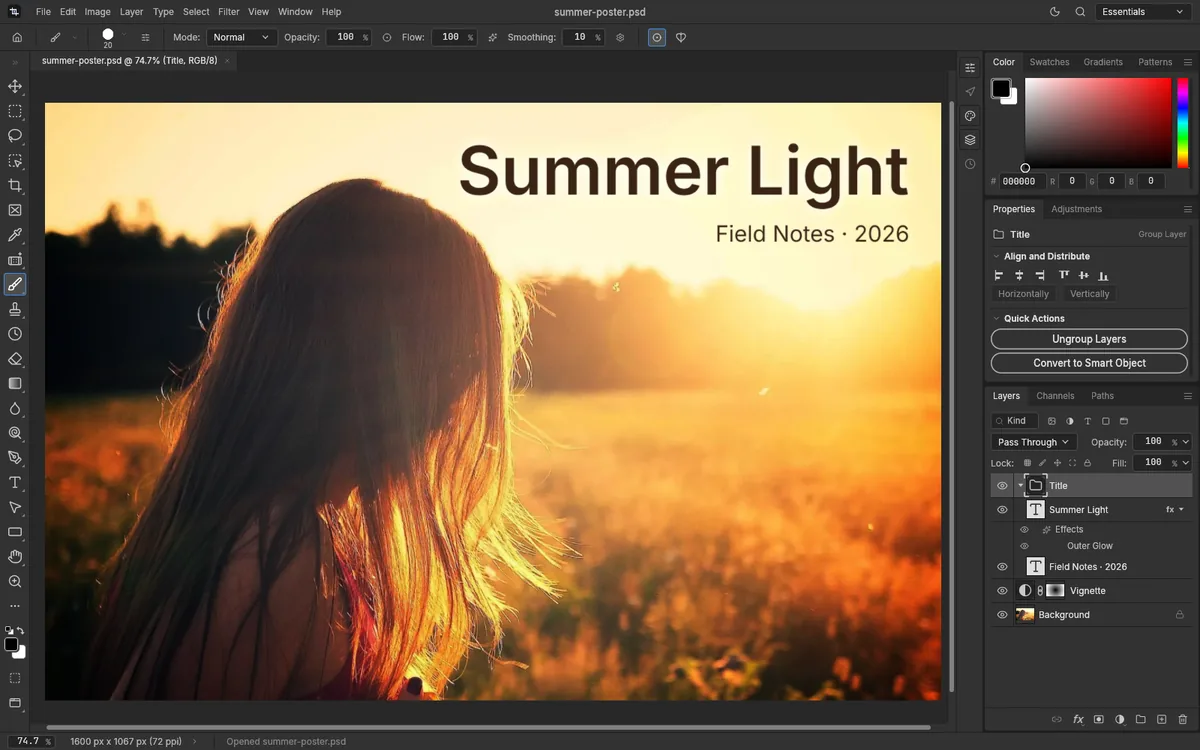
In the editor, each layer stays separate: text you can still edit, shapes, masks, and adjustment layers that change the photo below without touching its pixels. A PSD file keeps its layers the same way, and PhotopixPro opens them as they are. New to layers? Read how layers work and what a layer mask does.
Point at a layer to lift it out of the stack Tap a layer to lift it out of the stack
Open, edit or convert a file
PSD, JPG, PNG, HEIC or camera RAW: each page opens your file in the editor and shows the steps for that job.
Open a PSD file
See every layer, mask and text of a PSD without Photoshop.
Edit a PSD online
Change text, hide layers, adjust colors and save it as a PSD again.
Edit a PNG or JPG
Crop, resize, retouch and add text, then export it again.
Convert PSD to PNG
Export the whole image or just the layers you pick, with transparency.
Convert PSD to JPG
A smaller JPG for email or the web, at the quality you pick.
Convert HEIC to JPG
Turn HEIC photos into JPG without uploading them anywhere.
Open a RAW photo
Open CR2, NEF, ARW and DNG photos and export them as JPG.
Convert PNG to PSD
Turn a PNG or JPG into a PSD and build layers on top.
Menus in the same order as in Photoshop
The ten menus have the same names and order as in Photoshop, the shortcuts are the Photoshop defaults, and Edit > Search… finds a command by name.
- Layers and masks
- Groups, layer masks, vector and clipping masks, and the 27 Photoshop blend modes.
- Adjustment layers
- Curves, Levels, Hue/Saturation and 13 more, which you can change later without losing pixels.
- Editable text
- Text layers stay editable. Pick from 15 free fonts, among them Roboto, Open Sans and Arimo, which has the same letter widths as Arial.
- Retouching without AI
- Spot Healing Brush, Clone Stamp, Content-Aware Fill and Select Subject. Remove Background works best on clean backgrounds.
- PSD, HEIC and RAW files
- PSD and PSB with their layers, plus JPG, PNG, WebP, TIFF, HEIC, Canon, Nikon and Sony RAW, and DNG.
- No watermark
- PNG, JPG, WebP and TIFF exports come out clean, and your work saves as a PSD with its layers.
Menus
Panels
Your photos don't leave your computer
The editor downloads once and then works inside your browser. The files you open are read on your device and never sent to our server or anyone else's. Our privacy policy shows how to check that nothing is uploaded.
Opened on your device
Your browser reads the file from your disk. Nothing is uploaded.
Edited in the tab
Every change is made on your computer, with no server in between.
Saved to your computer
Saving downloads a PSD, or an export, to your downloads folder.
What our server sends you
The editor's own files, about 11 MB on your first visit. After that, your browser keeps them in its cache.
Photoshop shortcuts, as you know them
The editor uses the default Photoshop keyboard shortcuts. Change any of them in Edit > Keyboard Shortcuts…, or see the shortcuts by menu.
On a Mac, use Cmd instead of Ctrl and Option instead of Alt.
Your browser may keep Ctrl+N, Ctrl+T and Ctrl+W for itself: use File > New…, Edit > Free Transform and File > Close. Mac keys aren't tested yet.

PhotopixPro at a glance
Price, privacy, formats and limits in one place. The file and browser rows come from our own tests.
| Compared item | PhotopixPro |
|---|---|
| Price | Free, for personal and commercial work. No paid plan |
| Account | None. There's nothing to sign up for |
| Ads | None |
| Watermark | None on PNG, JPG, WebP or TIFF exports, or on a saved PSD |
| Your files | Read and edited in your browser, never uploaded |
| AI | None. Retouching, Select Subject and Remove Background use classic algorithms |
| Opens | PSD and PSB with their layers; JPG, PNG, WebP, TIFF and HEIC; RAW from Canon, Nikon, Sony and DNG |
| Saves and exports | Saves PSD. Exports PNG, JPG, WebP and TIFF |
| Runs in | A desktop browser with WebGPU or WebGL2. Tested in Chromium on a server; not yet in Chrome, Edge, Firefox or Safari on real computers |
| Best for | People who receive PSD files and don't have Photoshop, and anyone who wants a free photo editor with layers in a browser |
| Not for | Phones, offline work, AI generation, or text in the fonts installed on your computer |
| Tested | 21 real PSD files, 6 of them made with Photoshop, all opened on October 17, 2026. See how we test it |
Frequently asked questions
Short answers about price, commercial use, privacy, file formats and the editor's limits.
Is PhotopixPro really free?
Yes. There's no payment, no paid plan and no account, and there are no ads. You don't sign up for anything: open the editor and start. Nothing you save or export gets a watermark: not a PNG, a JPG or a PSD. PhotopixPro is a product of PhotoPix Solutions, and you can read who we are and how we test the editor.
Can I use PhotopixPro for commercial work?
Yes. You can use it for client projects, product photos or images you sell, at no cost and with no license to buy. The images you create are yours: your files never reach us, and we claim no rights over them. If you start from someone else's photo, you still need the right to use it. Our terms of use have the details.
Do I need to download or install anything?
No. PhotopixPro is a web-based editor that runs in a desktop browser tab, so there's nothing to install and no admin rights to ask for. The first visit downloads the editor, about 11 MB, and your browser caches it for next time. It needs WebGPU or WebGL2, which modern desktop browsers have. So far we've tested it in Chromium; Firefox and Safari are still on our list.
Is PhotopixPro safe? Are my photos uploaded?
PhotopixPro never uploads your photos: your browser reads each file from your disk and the editor works on it inside the tab, with no telemetry or error reporting. There are no ads and no account. The site counts visits with Google Analytics, which sets its cookies only if you accept them. Our privacy policy has the details and shows how to check this yourself.
Which files can PhotopixPro open and save?
PhotopixPro opens PSD files with their groups, masks, text, smart objects, adjustment layers and layer styles: in our tests on October 17, 2026, all 21 real PSD files opened, six of them made in Photoshop. It also opens PSB files (we've tried small ones so far), JPG, PNG, WebP, TIFF, HEIC photos and RAW files from Canon, Nikon, Sony and DNG. It saves your work as a PSD and exports PNG, JPG, WebP and TIFF. Have a PSD? Open your PSD online.
Is it the same as Photoshop?
No, and it isn't made by Adobe. It uses the Photoshop menu names, in the same order, and its default shortcuts, so it feels familiar. But it has no AI tools, it can't use the fonts installed on your computer, and there's no phone version. To see what you gain and lose, compare it with Photoshop and other free alternatives and with Photopea.
What can't PhotopixPro do?
PhotopixPro has no AI or generative tools. It can't use the fonts on your computer: if you edit text set in another font, it switches to a substitute until you pick one of the 15 free fonts. There's no offline mode and no autosave, so save often with Ctrl+S. It isn't designed for phones, it can't paste images copied from other apps, and it doesn't open PDF, AI, EPS, AVIF or JPEG XL files. See the full list of limits.
Does it work on my phone?
It's built for a computer with a keyboard and a mouse or pen, and it has no phone layout. If you open the editor on a phone, it doesn't download until you ask, and it offers to share the link so you can open it later on your computer.

Open your first photo
The editor opens in this tab. Nothing to install, no account, and your file stays with you.